
Table of Contents
Snap in a VPS
You can use Snap in a VPS on vpsAdminOS. It needs the snapd service and
access to FUSE. New VPSes have FUSE enabled and are ready for Snap; you only
need to install the distribution packages.
Installation on Ubuntu
See the
current Snap documentation for Ubuntu
for supported releases. If the snap command is not installed yet, install
snapd:
apt update
apt install snapd
On a system with systemd, make sure its socket is running and wait for initial setup to finish:
systemctl enable --now snapd.socket
snap wait system seed.loaded
For another distribution, follow the current Snap installation guide. Package names and service setup may differ.
Verification
Verify the installation with a simple snap:
snap install hello-world
snap run hello-world
Inspect the system state and service messages with:
snap version
snap debug sandbox-features
systemctl status snapd --no-pager
journalctl -u snapd -n 100 --no-pager
Individual snaps may require additional privileges or features that are not
available inside a container VPS. A working hello-world therefore does not
guarantee that every application will work.
VPS without /dev/fuse
If a VPS does not have the /dev/fuse device, check its configuration:
test -c /dev/fuse && echo "FUSE is available"
Enable FUSE in the Features form in the VPS details. It is enabled by default on newly created VPSes. Changing a VPS feature restarts the VPS automatically; wait for it to start again, then repeat the test.
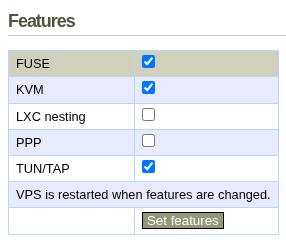
If Snap still fails, send support the VPS ID, snap name
and relevant output from journalctl -u snapd.
Page Tools


